Introduction
CQRS (Command Query Responsibility Segregation) is a design pattern that separates the model used to make changes from the model used to retrieve and present information.
CQRS is often discussed alongside Domain-Driven Design (DDD) and explained in terms of scaling reads independently of writes. That is one benefit, but it can obscure another reason to separate the models.
As we will see in this article, information asymmetry is at the heart of CQRS, not just asymmetry of scale.
Decision-making in DDD
Domain-Driven Design is an approach to software development that centers the development on programming a domain model that has a rich understanding of the processes and rules of a domain.
The quote above is the opening sentence from Martin Fowler’s article on Domain-Driven Design, and I want to focus on the processes and rules part here.
A model that captures the rules of a domain can tell you whether a particular action is valid or not. The model, in essence, is a decision maker.
Submitting an expense claim
Let’s look at a simple example. I’m sure many of us have submitted expense claims using a form similar to the one below:
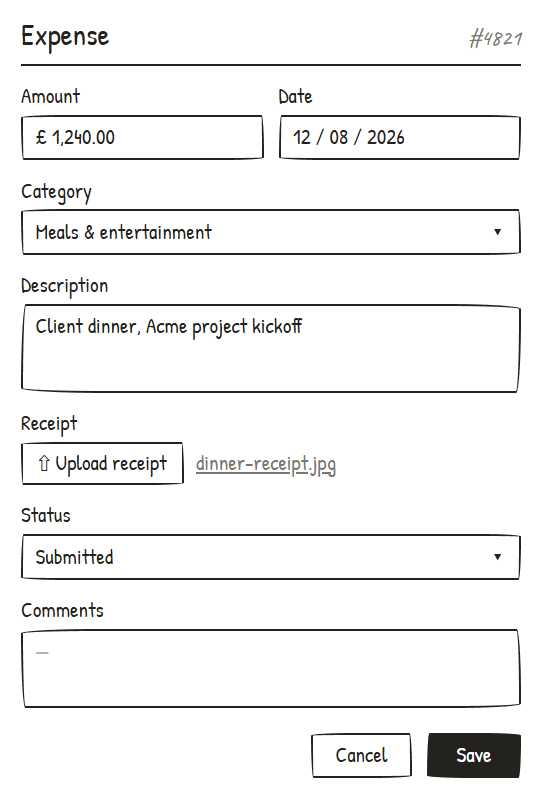
The form contains attributes needed to submit the expense claim. To do so, we set the status to Submitted and press the save button.
The approver, typically the user’s manager, loads the expense record and either approves or rejects it.
They do this by setting the status to either Approved or Rejected and saving again.
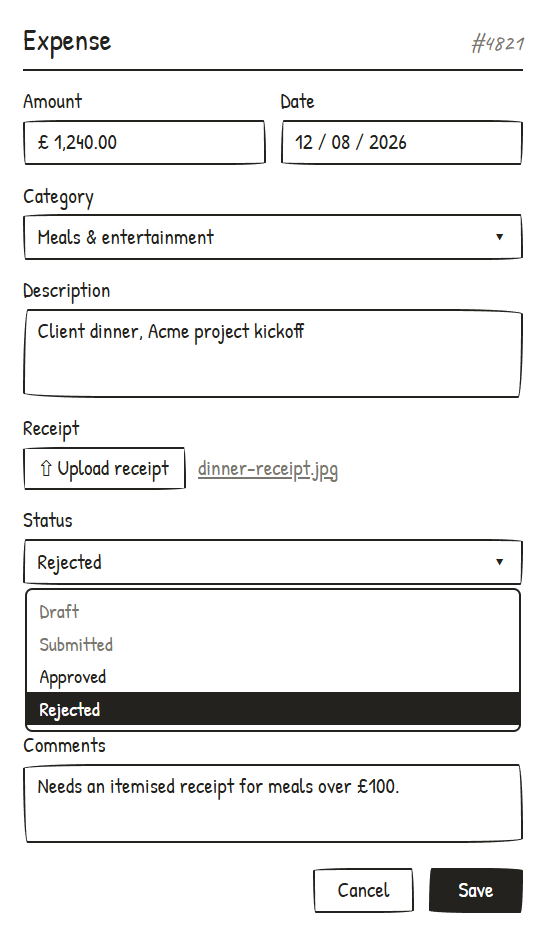
This screen is a typical CRUD screen, named for the different actions a user can typically perform: (C)reate (R)ead (U)pdate and (D)elete.
The table below shows how the data may evolve over time. We can see that user jokafor initially saved the expense as a draft, then added the description and submitted it before user psingh rejected it.
| Version | ID | Amount | Description | Date | Status | User |
|---|---|---|---|---|---|---|
| 1 | 4821 | 1240.00 | 2026-08-12 | Draft | jokafor | |
| 2 | 4821 | 1240.00 | Client dinner… | 2026-08-12 | Submitted | jokafor |
| 3 | 4821 | 1240.00 | Client dinner… | 2026-08-12 | Rejected | psingh |
So far, so good, but what does this have to do with decisions and information asymmetry?
Information asymmetry
The flow that we’ve described here presents the same data to the user on screen as is saved through their actions. This symmetric nature is a common feature of CRUD-based user interfaces.
The UI is essentially a view over a database record that is created, read and then updated or deleted. The system has rules in place to verify that the data can be changed in a way that follows business processes; e.g., in an expense management system, only certain users would likely have permissions to approve or reject a claim.
These kinds of user interfaces are great at capturing the results of decisions, but they have limitations for modelling the decisions themselves.
If the manager needs to make a decision about whether to approve this particular expense claim, then the information they need to do so may not be the same as what the original user submitted. They may want to see whether this claim is unusual for the employee in question, whether it aligns with project timelines, whether it meets various policies the organisation may have in place for expense claims, etc.
The result of the decision is either ‘Approve’ or ‘Reject’, but the information needed to make that choice is not necessarily present in the submitted expense claim.
OK, so what should we do instead to model the decision better?
Task-based user interfaces
A task-based user interface is an alternative to a CRUD user interface. Instead of designing screens around the data to be loaded and saved, we design screens around tasks and the decisions they involve.
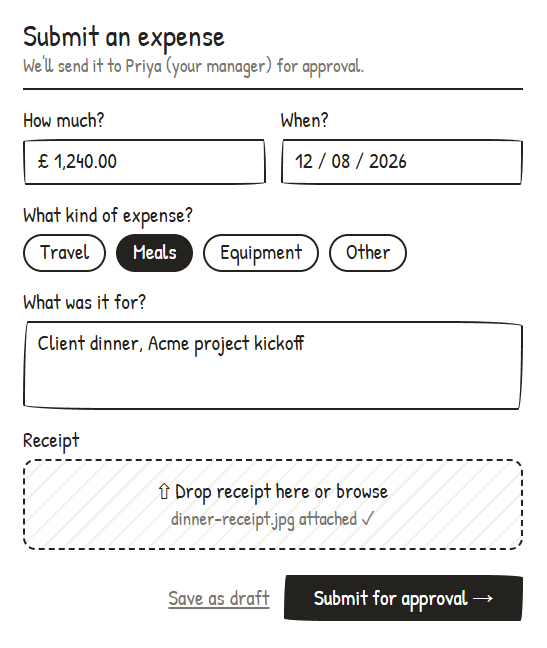
For submitting an expense, the screen is broadly the same as the CRUD example. The main difference that I want to focus on is in the buttons at the bottom of the screen.
With the CRUD example, the user selects a status from a dropdown and clicks the “Save” button to save the latest state.
In the task-based example, we show the user that there are two tasks they can perform: “Save as draft” or “Submit for approval”. It’s a minor difference, but it brings clarity to the options available to the user.
The major difference between the CRUD and task-based examples is around approval of the expense. This is a key place where we identified an information asymmetry earlier.
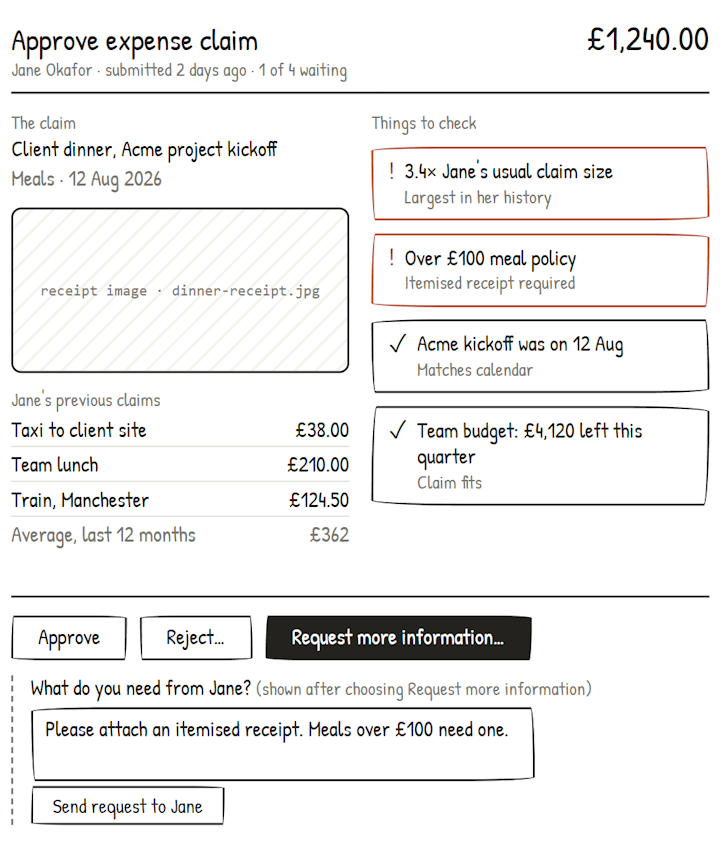
This is now vastly different to the CRUD example.
Starting from the top, we can see immediately that the heading identifies the task: approving an expense claim.
We said that the information needed to decide whether to approve an expense claim is not necessarily the same as the information that was submitted by the original user.
The screen demonstrates this by surfacing the details of the attached receipt, a list of recent claims and various policy points to check alongside the information that was submitted by the user.
Although the manager reads all this supporting information, the approval command only needs to identify the claim and express the requested action; it does not need to send the entire screen’s contents back to the system.
The user approving the expense claim does not see a form similar to that used to submit the claim. Instead, they see something that gives them the information they need to make their decision.
Notice that the majority of information on the screen is read-only.
The actions the user can take are approving the claim, rejecting it with some comments or requesting more information.
CQRS appears as a consequence of modelling decisions
Bringing the topic back to CQRS, we can now see that when we model decisions and the information needed to make them, it nudges us towards having separate models for the different responsibilities.
The read model presents the relevant information needed to make a decision. In this case, the claim, receipt, previous claims, policy information and context around the budget.
The write model handles the tasks such as approving or rejecting the claim and enforces the rules governing those actions.
Separate APIs, databases, services and deployment units can follow from the separate models, but those concerns are optional.
So what does this mean when designing systems?
It’s important to stress that this approach is useful where the decisions and rules justify it; simple data maintenance may be better served by CRUD.
The important thing to understand is what decisions people are making as they interact with the data and perform tasks.
Focus shifts from data attributes towards user journeys and workflows. Understanding what people are trying to achieve, what information they need, and what rules govern the tasks.
The payoff is that your applications more accurately model what users do and not just what data they need to save.
While approving the expense claim, we may want to highlight particular policies, e.g. that all claims above a certain limit require an itemised receipt. In the CRUD example, the same policies may exist but not be surfaced in the same way as the screen is not organised around the decision.
Making tasks and their governing policies explicit in the model makes the system’s behaviour easier to understand, test and change. It also provides a clearer basis for deciding which parts of the workflow can be automated.
If your applications capture data well but struggle to model the decisions and tasks behind that data, then get in touch to discuss how domain modelling can help.